Cinesamples CineHarps v1.1 KONTAKT
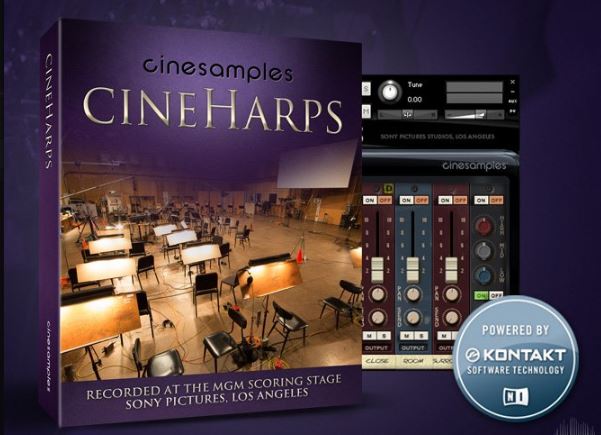
CineHarps 是一系列深度采样的管弦乐竖琴,易于使用,并拥有丰富的技巧和功能,使其成为任何作曲家模板中的经典之作。CineHarps 在位于洛杉矶的索尼影业工作室的米高梅配乐舞台录制,拥有丰富的视角,能够完美融入任何混音。
值此里程碑式产品 CineHarps 十周年之际,Cinesamples 荣幸地推出全新构想、深度采样的续作——CineHarps。CineHarps 在位于洛杉矶的索尼影业工作室历史悠久的米高梅配乐舞台录制,保留了原版 CineHarp 的易用性和丰富的技巧,同时添加了纯净的音频保真度和改进的功能,使其成为任何作曲家模板中的经典之作。
CineHarps 在配乐舞台的三个不同位置录制,包含多种演奏技巧和音色——拨弦音色、精准的滑音以及令人难以置信的强劲效果。无论作品需要古典竖琴技巧还是混合声音设计方法,CineHarps 都能为作曲家提供最丰富的竖琴音色。与所有 CineSymphony 音色库一样,CineHarps 音色库无需您购买任何额外的采样播放软件,并且已获得授权可与 Native Instrument 的免费 Kontakt Player 配合使用。您只需要一个音序器,例如 Logic、Cubase、Digital Performer、LIVE、Pro Tools、Cakewalk,甚至 Apple GarageBand,即可开始使用。
CineHarps 新增了透视模式。开启透视模式后,会出现一个滑块,可在近距离、房间和环绕声麦克风透视之间进行平滑的交叉淡入淡出。此滑块会自动映射到调制轮,让您能够即时控制乐器的相对深度。
滑音模式会根据所选音符和踏板图对所有白键进行移调。这样可以轻松在白键上演奏滑音。当”滑音模式”按钮处于活动状态时,快速乐句中的音符起音会逐渐减弱。演奏速度越快,起音越弱。提示/技巧:开启”滑音模式”并将踏板设置为C大调,可以进行半音演奏,同时仍会减弱快速乐句中每个音符的起音,从而产生更逼真的颤音、双音符连奏和其他类型的演奏。
在”关闭”麦克风视角上方有一个标有”D”的黄色小按钮。激活此按钮可将”关闭”视角的声音延迟约15毫秒,使”关闭”视角与”房间”和”环绕”视角在时间上保持一致,从而产生更紧凑的声音。关闭”关闭延迟”可使乐器更具深度和清晰度,这有助于将其融入混音中。
力度曲线控件可用于精确调节您想要的动态。 Bias Forte 模式可轻松演奏高音动态,Bias Piano 模式则可轻松演奏弱音动态。Linear 模式可使力度均匀分布。力度曲线控制旋钮还可用于补偿 MIDI 键盘过硬或过软的音调。您可以通过鼠标点击并拖动来自定义力度曲线。
释放模式旋钮可改变释放音的演奏方式。”静音”模式模拟竖琴演奏者在释放音符时立即抑制琴弦,”颤音”模式则允许琴弦在整个音长范围内发出声音,忽略任何音符的释放。”正常”模式则提供适度的释放衰减。此控制旋钮与释放音量控制旋钮配合使用,可精准控制您想要的释放音行为。
制作人:Michael Barry 和 Michael Patti项目总监:Tim StarnesKontakt 脚本:Ben Chrisman录音工程师:Adam Michalak混音工程师:Tim Starnes采样编辑:Elan Hickler、Casey Merhige、Elvis Bates质量保证:Elisa Rice
CineHarps is a collection of deeply sampled orchestral harps that’s easy to use and is loaded with techniques and features that will make this a classic in any composer’s template. Recorded with wide variety of perspectives at the MGM Scoring Stage at Sony Pictures Studios in Los Angeles, CineHarps will fit nicely into any mix.
For the 10th anniversary of our landmark product CineHarps,Cinesamples is proud to present the completely re-imagined, deeply-sampled sequel – CineHarps. Recorded at the historic MGM Scoring Stage at Sony Pictures Studios in Los Angeles, CineHarps captures the ease of use and varied techniques of the original CineHarp while adding pristine audio fidelity and improved features that will make this a classic in any composer’s template.
Recorded in three distinct positions on the scoring stage, CineHarps includes multiple articulations and timbres – plucked patches, precise glissandi, and incredibly robust effects. Whether a composition calls for classical harp techniques or a hybrid sound design approach, CineHarps offers composers the richest harp sounds available.As with all CineSymphony libraries, CineHarps library does not require you to purchase any additional sample playback software, and is licensed to work with the Native Instrument’s free Kontakt Player. All you need is a sequencer like Logic, Cubase, Digital Performer, LIVE, Pro Tools, Cakewalk, or even Apple GarageBand and you’ll be up and running.
CineHarps includes the addition of a new Perspective Mode. When Perspective Mode is turned on, a slider appears that performs a smooth crossfade between the Close, Room, and Surround microphone perspectives. This slider is automatically mapped to the mod wheel, giving you the ability to instantly control the relative depth of the instrument.
Gliss Mode transposes all of the white keys according to the selected notes and pedal diagram. This allows for easy playing of glissandi on the white keys. When the Gliss Mode button is active, note attacks in faster phrases are gently softened. The faster you play, the softer the attack.Tip/Trick: Turning on Gliss Mode and leaving the pedals set to C major allows you to play chromatically, but still softens the onset of each note in faster phrases, which can result in more realistic trills, bisbigliandi and other types of playing.
Above the Close microphone perspective is small yellow button marked with a “D”. Activating this button delays the sound of the Close perspective by approximately 15ms, which time aligns the Close with the Room and Surround Perspectives, resulting in a tighter sound. Turning off the Close Delay gives the instrument more depth and definition, which can be useful for featuring it in the mix.
The Velocity Curve control can be used to dial in exactly the dynamic you are looking for. Bias Forte makes it easier to play louder dynamics, and Bias Piano makes it easier to play soft dynamics. Linear allows the velocities to pass through unaffected. The Velocity Curve control can also be used to compensate for a MIDI keyboard with an undesirably hard or soft action. You can custom-draw a velocity curve by clicking and dragging with the mouse.
支持系统:Windows.MAC
加载方式:Kontakt 7. Kontakt 8加载
文件大小:10GB
登录并开通会员即可下载此资源
登录 / 开通会员