DIFF Devices STEREOID Max for live device 立体声宽带插件
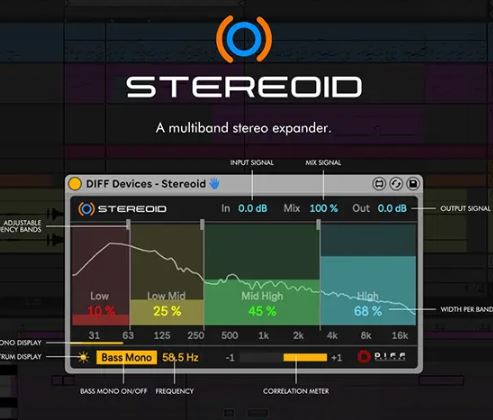
STEREOID 是一款功能强大的 Max for Live 设备,可精确调整音轨或母带的立体声宽度。
• 每频段立体声宽度(4 频段)• 可调频段• 低音单声道开关• 频谱显示• 相关性计• 混音信号• 图形用户界面与 Ableton Live 主题匹配
压缩包内包含以下文件:1. DIFF 设备 – Stereoid.amxd2. 将 .amxd 文件保存到计算机上的任何位置,或保存您之前保存 maxforlive 设备的文件夹中。3. 将设备拖放到 MIDI 音轨中。4. 点击”保存”(位于窗口右侧,带有”软盘”图标)…(请查看手册。)5. 这会自动将设备保存到”位置”中的”用户库”文件夹(”头部轮廓”图标),同时还会保存一个”.adv”文件,可用于存储您喜欢的初始设置。6. 一切就绪。
• MAC 和 WINDOWS* 仅适用于安装了 Max 的 Ableton Live。* 需要 Ableton Live V11(最低版本)。* 兼容 M1 Mac。主页
STEREOID is an impressive Max for Live device to precisely adjust stereo width on your tracks or your master.
• Stereo Width per band ( 4 bands )• Adjustable Frequency bands• Bass Mono On/Off• Spectrum display• Correlation Meter• Mix Signal• GUI match Ableton Live Themes
INSTALATION & USAGE GUIDE
Inside the zip file you have an file :1. DIFF Devices – Stereoid.amxd2. Save the .amxd file anywhere on your computer or in a folder that you previously saved your maxforlive devices.3. Drag and drop the device into a midi track.4. Click on save (on the right hand side of the window: with a ‘floppy disk’ icon)… (Check Manual.)5. This will automatically save the device to your ‘User Library’ folder in ‘Places’ (the ‘head outline’ icon), and will also save a ‘.adv’ file which can be used to store your favourite initial setup.6. You’re good to go.
• MAC & WIN* Only works in Ableton Live with Max installed.* It Requires Ableton Live V11 (minimum).* M1 Mac Compatible.home page
支持系统:Windows
文件大小:3MB
登录并开通会员即可下载此资源
登录 / 开通会员