Antares Auto Tune Pro X 10.3.1 旗舰人声调音软件
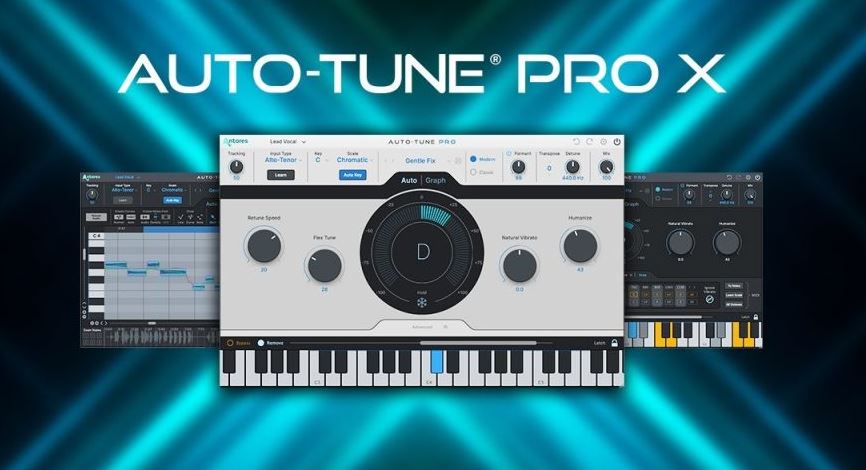
隆重推出全新 Auto-Tune Pro X!Antares Audio Technologies 欣然推出全新 Auto-Tune Pro X。Auto-Tune Pro X 经过重新设计和构想,以满足未来人声制作的需求,是我们旗舰人声调音软件的现代化版本。Auto-Tune Pro X 继承了原版(备受赞誉的)Auto-Tune Pro 的精髓,并新增了许多功能以及数十项工作流程改进和增强。Auto-Tune Pro X 标志着这款最具影响力的音频制作工具在速度和易用性方面实现了重大飞跃。
Auto-Tune Pro X 的主要新功能之一是重新设计和改进的图形模式,它提供了极其精确的音高校正功能。简化的音符对象视图和精简的用户界面使图形模式在更广泛的项目中更易于使用。即使是初学者也可以在图形模式下工作,因为音符对象现在会自动创建,并可以通过鼠标上下移动到最接近的正确音高。图形模式在精准度和易用性之间取得了完美的平衡,适合经验丰富的专业人士和有前途的初学者。
或者,如果您希望将工作交给我们,也可以选择自动模式。自动模式是 Auto-Tune Pro X 独有的,是自动调整人声的最佳方式。只需加载音轨,设置参数,我们的专业技术就能将您的音符调整到最佳位置。简单、高效,自动模式。
图形模式Auto-Tune Pro X 的时间标尺具有循环功能,并且与主机的循环标尺具有双向同步功能。基本上,当您在图形中创建循环时,DAW 会将相同的循环点放在其时间轴中,反之亦然,即 DAW 到图形。这使得图形模式感觉像是 DAW 的集成部分。
另一个主要亮点是我们的时间标尺与主机的时间标尺的双向同步。当您点击图形中的某个点时,DAW 的播放头会自动移动到同一点。反之亦然。这可以节省大量时间,因为它可以让您专注于图表,而无需在我们的控件和 DAW 控件之间来回切换。
Auto-Tune Pro X 速度很快——真的非常快。该软件现在基于最新 Apple 硬件的 Apple Silicon 原生运行,因此您可以获得最佳性能。(我们之前提到过它速度很快吗?)
当然,您无需成为专业人士即可使用 Auto-Tune Pro(尽管它的名字里有”专业人士”二字)。只想立即上手?Auto-Tune Pro X 拥有数十个独家艺术家预设和一个全新的省时预设管理器,可让您保存最常用的设置,以便在任何项目中快速启动。
多视图当您同时运行大量音轨时,全新的多视图功能就派上用场了。使用多视图,您可以在单个窗口中快速切换不同的 Auto-Tune 音轨,从而更快地编辑多个人声。以前,您需要导航到某个音轨,找到效果器部分,打开 Auto-Tune,调整参数,关闭 Auto-Tune,找到下一个音轨,点击它,转到其效果器部分,打开 Auto-Tune,调整参数……等等。现在,有了 Auto-Tune Pro X,您可以在一个窗口中完成所有调整!
Introducing the New Auto-Tune Pro X!Antares Audio Technologies is thrilled to release the new Auto-Tune Pro X. Redesigned and reimagined to meet tomorrow’s vocal production demands, Auto-Tune Pro X is the modern edition of our flagship vocal tuning software. Auto-Tune Pro X picks up where the original (and celebrated) Auto-Tune Pro left off, and is packed with new features and dozens of new workflow improvements and enhancements. Auto-Tune Pro X marks a major leap forward in the speed and ease-of-use of one of most influential audio production tools ever made.
Among the key new features in Auto-Tune Pro X is a redesigned and improved Graph Mode which provides extremely precise pitch correction capabilities. The simplified note-object view and streamlined user interface have made Graph Mode even easier to use over a wider range of projects. Even the beginner can work in Graph Mode as note objects are now created automatically and are ready to be moved by mouse up or down to the nearest correct pitch. Graph Mode strikes a powerful balance between precision and ease-of-use, experienced professional and promising beginner.
Or turn to Auto-Mode when you prefer to leave the work to us. Auto-Mode is exclusive to Auto-Tune Pro X and is the best way to automatically tune your vocals. Simply load up your track, set your parameters, and let our technological expertise get your notes to their optimum positions. Easy, effective, Auto-Mode.
Graph ModeAuto-Tune Pro X features a looping capability in our time ruler that also has bi-directional sync with the host’s looping ruler. Basically, when you make a loop in our Graph, the DAW puts the same loop points in its timeline or the other way around, DAW-to-Graph. This makes Graph Mode feel like it’s an integrated part of the DAW.
Another key highlight is the bi-directional sync of our time ruler and the host’s. When you click on a spot in our Graph the DAW playhead automatically goes to the same spot. And vice versa. This is a huge time saver because it lets you stay focused on the Graph without bouncing between our controls and the DAW’s controls.
Auto-Tune Pro X is fast—really fast. The software now runs natively on Apple Silicon in the latest Apple hardware so you get optimal performance. (Did we mention it was fast?)
Of course, you don’t need to be a pro to get going with Auto-Tune Pro (even though it’s in the name). Just want to jump right in? Auto-Tune Pro X boasts dozens of exclusive artist presets and a new, time-saving Presets Manager that lets you save your most commonly used settings for a quick start on any project.
MULTI-VIEWAnd for when you’ve got a ton of tracks running at the same time, the new Multi-View feature comes into play. With Multi-View, you can quickly switch between separate Auto-Tune tracks in a single window to edit multiple vocals, faster. Previously, you needed to navigate to a track, find the effects section, open Auto-Tune, adjust parameters, close Auto-Tune, find the next track, click on it, go to its effect section, open up Auto-Tune, adjust parameters…etc. With Auto-Tune Pro X you can make all your adjustments from one window!
支持系统:Windows
文件大小:88MB
登录并开通会员即可下载此资源
登录 / 开通会员