Analog Obsession ReLife V2.0 音色塑形器插件
你的足迹值得第二次机会!只需通过”ReLife”为你毫无生气的足迹赋予第二次生命!易于使用,效果立竿见影!
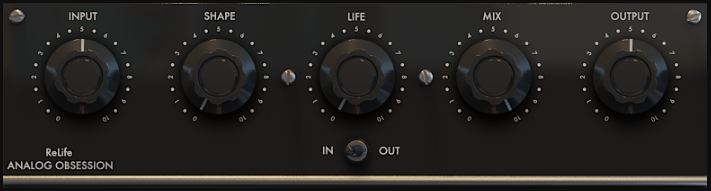
-输入:增益补偿输入旋钮将帮助您找到生活的最佳点。您可以通过输入获得更软或更硬的结果。
-形状:预定义的均衡器将通过精心挑选的动态乐队塑造您的声音。
-生活:它会让你给你的足迹赋予生命。更高的设置不会破坏您的材质,直到您将其与输入旋钮结合。
-MIX:混合你处理和干燥的信号
-输出:清洁输出以设置最终电平
-模拟会话:此标签可点击。它将变为红色并进行过采样(4x)
可调整界面大小。简单的”右下角手柄”可调整大小。50%至200%。
Your Tracks Deserve A Second Chance!Simply give second life to your lifeless tracks with “ReLife”! Easy to use and instant result!FEATURES- INPUT : Gain compensated input knob will help you find sweet spot of your life. You can get softer or harder results with input.- SHAPE : Pre-defined EQ will shape your sound with carefully selected dynamic bands.- LIFE : It will let you give life to your tracks. Even higher settings won’t destroy your material until you combine it with INPUT knob.- MIX : Blends you processed and dry signal- OUTPUT : Clean output to set final level- ANALOG OBSESSION: This label is clickable. It will turn to red and engage Oversampling (4x)Resizable interface. Simple “Bottom Right Corner Handle” to resize. 50% to 200%.*Resizing Tip: When you duplicate plug-in, it will remember current state of GUI size. But if you load new instance, it will be opened at default size. To get rid of this issue, simply follow these steps;1. Open plug-in for the first time2. Resize GUI according to your screen resolution or you liking before setting any knobs3. Save this state as default preset with your DAWNow, you will be able to load new instances with same size.(If you want to go default size, simply double click to resize handle.)Version 2.0 – 22.10.2024Available FormatsVST3 / AU / AAX Native – Audiosuite | Mac 10.11 or Higher | Intel / Apple SiliconVST3 / AAX Native – Audiosuite | Windows 10 – 11Mac Versions require a graphic card that supports “Metal”Windows Versions require a graphic card that supports “OpenGL”
支持系统:Windows mac
文件大小:20MB
登录并开通会员即可下载此资源
登录 / 开通会员