Youlean Loudness Meter 2 v2.5.11 响度测量
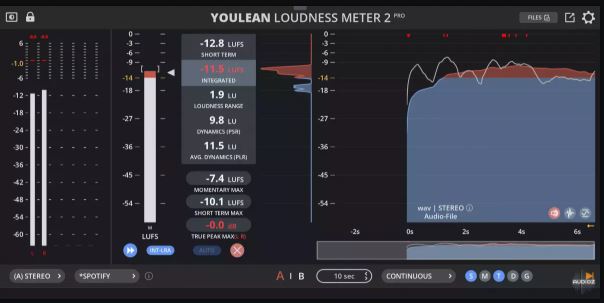
Youlean响度计可帮助您找到音频的真实感知响度,并为电视或流媒体服务发布做好准备。加入成千上万已经使用它的录音室。
加入成千上万已经使用它的录音室。
100%精确计量该插件已根据ITU-R BS2217测试材料进行了校准和测试。它满足ITU-R BS.1770文件中定义的所有要求。
可用作应用程序、VST2、VST3、AU和AAX插件格式、Windows和macOS操作系统。
测量音量帮助您遵守电影和电视行业的严格响度要求。
测量动力学防止你的混音听起来破碎和不专业。
充分利用您的混音,让任何曲目在所有流媒体平台上听起来都很棒!
此版本包括:电影、电视和游戏预设LU、INT、TP、LRA、PLR、DR读数调整大小、缩放GUI迷你视图自定义真实峰值警报阈值真实峰值和响度图响度分布图自动响度过低音单声道、立体声和5.1声道低CPU消耗永久有效
DAW插件和APP适用于几乎所有DAW:FL Studio、Logic Pro X、Final Cut Pro X、Ableton Live、Reaper、Cubase、Pro Tools…
帮助您获得正确的响度级别,以便上传到Spotify、YouTube、Apple Music、Apple Podcast、Amazon Alexa、Amazon Music、Tidal、Deezer、Netflix、HBO和Disney+。
Youlean Loudness Meter helps you find the true perceived loudness of your audio and prepares it for TV or streaming services release. Join the thousands of recording studios that already use it.Join the thousands of recording studios that already use it.100% accurate meteringThe plugin is calibrated and tested against ITU-R BS2217 testing materials.It satisfies all requirements defined in ITU-R BS.1770 document.DAW plugin & APPWorks in almost any DAW: FL Studio, Logic Pro X, Final Cut Pro X, Ableton Live, Reaper, Cubase, Pro Tools…Available as application, VST2, VST3, AU and AAX plugin formats, Windows and macOS operating systems.Measure LoudnessHelps you comply with strict loudness requirements for the Film and TV industry.Helps you get the correct loudness levels for upload to Spotify, YouTube, Apple Music, Apple Podcast, Amazon Alexa, Amazon Music, Tidal, Deezer, Netflix, HBO, and Disney+.Measure DynamicsPrevent your mix sounding crushed and unprofessional.Get the most out of your mix, make any track sound great on all streaming platforms!This version includes:Film, TV and Gaming presetsLU, INT, TP, LRA, PLR, DR readoutsResizing, scaling GUIMini viewCustom true peak alert thresholdTrue peak and loudness graphLoudness distribution graphAutomatic loudness overdubMono, Stereo, and 5.1 channelLow CPU consumptionNever expiresSystem RequirementsWindows 7 or newer versions – 32 Bit, 64 BitmacOS 10.11 or newer versions – 64 Bit, Intel – Apple SiliconAvailable as APP, VST2, VST3, AU, AAX and Command Line ToolChangelog:v2.5.11Fixed crash when loading deleted default presetFixed crash when resizing GUI on Windows with OpenGL renderingFixed A/B state not working when graph saving is set to AUTOFixed Pro Tools crash when using bigger audio buffer sizesFixed reserve RAM buffers knob not working correctlyFixed some app audio settings don’t work correctlyFixed crash when changing audio settings in standalone appFixed AAE -30002 error in Pro ToolsFixed measurements start from silence after playhead jumps in Time Code modeFixed project files can not be saved on macOSFixed custom path for export doesn’t work on macOSAdded option to automatically export measurements after AudioSuite analysisAdded normalization function when using “Render” button in AudioSuiteAdded fonts for Japanese, Korean, Arabic, Thai, and Chinese languagesAdded momentary and short term bar optionsAdded option to disable renaming of the normalized fileAdded option to sync play head position when the playback is paused with Time Code histogram modeMeasurements won’t reset when transport loops and Elapsed or System Time histogram mode is usedMax analysis time is now 24 hours (it is actually infinite, but you can preallocate RAM for max 24 hours to avoid audio dropouts)Text scaling now scales max true peak values above the peak metersVarious small fixes
支持系统:Windows MAC
文件大小:274MB
登录并开通会员即可下载此资源
登录 / 开通会员